Choose your faction
Choose a faction to begin
Recorded client positions, not live spawns. Unconfirmed local names remain in English.
Map legend
Matching locations
0 locationsChoose a faction to begin
Your progress
0 Pets owned · 0 Collected · 0 Checked this run
Your route
What does this AION 2 map cover?
This AION 2 map helps Global players locate recorded objectives across six regions, choose useful stops and keep a personal checklist. It brings hidden cube candidates, pet soul sources, gathering nodes, Empyrean Traces, monsters and travel references into one workspace. Available layers differ by region, so start with your destination rather than turning on every category.
The AION 2 map is a planning companion, not a live view of your character or server. Use its records to decide where to look, then confirm availability and access in the game.
Choose an AION 2 map by region and faction
Choose the AION 2 map for the region you intend to explore. Verteron and Altgard contain the broadest collection of task layers in this dataset. Poeta and Ishalgen have more limited coverage. The two Reshanta maps represent different Abyss destinations; selecting one does not establish your character’s entry requirements.
The table describes records available here, not every activity that might exist in the game. Follow a region link for its map, category counts and named locations.
| Region | Faction / area | Available recorded layers | Useful starting task |
|---|---|---|---|
| Verteron | Elyos | Cubes, traces, pet sources, gathering, monsters, bosses, travel and entrances. | Compare collection targets with nearby Kibelisks. |
| Altgard | Asmodians | Cubes, traces, pet sources, gathering, monsters, bosses, travel and entrances. | Search a monster or material in Asmodian territory. |
| Poeta | Elyos | Monsters, one travel point and one entrance. | Find a recorded monster in the starting area. |
| Ishalgen | Asmodians | Monsters, travel points and an entrance. | Check names and travel references in the starting area. |
| Chaotic Lower Reshanta | Abyss | Traces, pet sources, gathering, monsters, bosses, travel and entrances. | Compare Abyss objectives after checking your destination. |
| Chaotic Outer Reshanta | Abyss | Monsters, pet sources and Kibelisks. | Locate a source creature in this separate Abyss region. |
A zero category count means this dataset has no corresponding records. It is not proof that the game never offers that activity. Website language changes labels and guides; it does not switch the AION 2 map between Global, Korean and Taiwanese versions.
How to use the AION 2 interactive map
Begin with a specific objective, such as finding a material or checking one missing pet. The AION 2 map works best when you narrow the view before planning a journey.
- Choose your faction or use the region selector. On a regional page, select another region to open its corresponding page.
- Choose Hidden cubes, Pet souls, Gathering or another task. Adjust individual layers when you need a different combination of targets and travel references.
- Search a place, pet, monster or material. If results disappear, clear the search and inspect the active filters before changing regions.
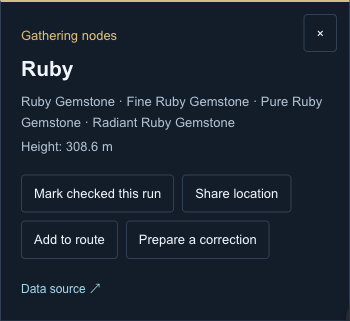
- Open a result to focus the AION 2 map on its position. Read the source, available height and material or monster details before adding a route stop.
- Zoom or pan to compare the surroundings. Use Fit visible locations to frame the filtered results; a dense cluster may need closer inspection.
On desktop, focus the map and use arrow keys to pan or plus and minus to zoom. The Matching locations list gives you another way to open results when overlapping markers are hard to select. These controls change the view, not your progress.
Find cubes, pets, resources and traces
Task filters answer different questions on the AION 2 map. Choose the objective first, then use its progress meaning consistently. A repeat visit to a resource is different from obtaining a pet or collecting a trace.
Hidden cube map: search candidates, not live chests
Use the hidden cube map to choose a small group of candidate positions in Verteron or Altgard. Keep travel points visible, open each target and compare its height with the terrain before committing to a detour. A nearby dot may sit on another level.
If you reach an empty spot, inspect nearby candidates instead of assuming the map is broken. The AION 2 map does not read chest availability or provide a verified universal respawn countdown. Mark the location checked for this search run; that record does not mean a cube can never return. Check the detailed guide for key and empty-location questions.
Pet farming maps: connect pets to their soul sources
Search the missing pet or its associated monster, then compare source records in the relevant region. Filter by family, such as Cogni or Fera, and monster level when appropriate. Several locations can lead to the same pet; they are not separate collection entries.
The pet directory on the AION 2 map distinguishes mapped monsters from recorded dungeon, shop and soul chest sources. If a pet has no field marker, inspect its source details before choosing somewhere to farm. Mark it owned only after confirming your collection in game. Ownership applies to that species across regions, so you do not need to mark every source creature.
When a directory entry offers Show on map, choose a region to focus its source positions. This clears conflicting missing-pet and completed filters so an owned pet can still be inspected. If there is no button, read the acquisition source instead of searching every map.
Gathering maps: search materials and check their grades
For a material search, try Ruby Gemstone or Orichalcum Ore. Both occur in the recorded Verteron and Altgard material relationships. The AION 2 map searches output names as well as the displayed gathering point name, helping you find nodes whose labels are not an exact match.
Inspect the material grade and any additional outputs before arranging stops. A possible output is not a guaranteed reward. Keep a short route that you can revise after checking actual terrain and gathering conditions; node counts alone cannot establish materials per hour.
Empyrean Traces: keep a one-time collection checklist
Choose exploration layers to work through recorded traces near a useful travel point. Check the position and any height information, collect the trace in game, then mark that exact entry. Hide completed entries when you want to focus on the remainder.
Trace percentages on the AION 2 map refer to this dataset’s recorded entries, not a reading of your character’s completion. Keep a backup before moving browsers. If you use several characters, avoid assuming that one browser checklist automatically distinguishes their collections.
Why can’t I find a marked location?
A missing object and a missing marker are different problems. Before reporting a coordinate error, compare the selected region, current filters and visible surroundings. This checklist helps you decide what to check next on the AION 2 map.
| What you see | What to check next |
|---|---|
| No matching results | Clear the name search, enable the relevant category and check pet family, level and missing-pet filters. |
| A previously marked entry disappears | Turn off Hide completed and compare the saved checklist with your current character. |
| The position looks right but nothing is visible | Check the recorded height and nearby ledges, water or other terrain levels before treating the coordinate as wrong. |
| An empty hidden cube candidate | Inspect nearby candidates. Neither a marker nor a previous visit confirms a chest is available now. |
| A pet is listed without a map button | Read its acquisition details. A dungeon, shop, chest or unresolved source may have no mapped field position. |
| A portal or entrance does not work | Read the destination and access message in game. An entrance record does not prove an active transfer. |
If a discrepancy persists, use Prepare a correction in the point details. Include what happened, the marker link, Global region and a relevant screenshot. The AION 2 map downloads a report file; use the Contact page’s email address to send it. Avoid including account credentials or unrelated chat.
Plan routes and save your AION 2 map progress
Build a route around a few nearby objectives and a travel point you can actually use. Add stops from their details, reorder them and check the terrain between them. Lines on the AION 2 map connect your selections; they do not calculate a walkable path, avoid enemies or unlock travel.
Share a location when someone needs one target, or share the current region’s route when you want to compare several stops. Keep the route short enough to change after seeing the terrain. A shared URL can reveal the chosen location, search or route, so inspect it before posting publicly.
The AION 2 map saves progress in this browser. Cube, gathering and monster checks record visits; pet ownership and collected traces serve different purposes. Export progress before clearing site data or changing devices, then import the file in the destination browser. Language switching retains the same saved identities. There is no account-based cloud sync, and a cleared browser record cannot be recovered without a backup.
Import validates backup contents before replacing saved state. If a file is rejected, keep the original and export your current progress before trying another copy. A shared route link does not transfer your entire collection.
AION 2 map data, sources and updates
The AION 2 map uses public client-derived and community location records. We check data structure, identifiers and map alignment; we have not personally surveyed every point in game. Official notices are used for reviewed game rules, rather than treating community coordinates as proof of current access.
A page review date is not the extraction date of every record. Updates can affect availability, names or coverage. Check the source link in a point’s details when investigating a mismatch, and consult the data-source and update pages for evidence boundaries. Records are not live spawn reports or a claim of complete game coverage.
Questions
Is this AION 2 map free to use?
Yes. You can use the map, filters, local checklist and backup tools without an account. This edition does not display advertisements. Your saved progress remains on the device and browser where you use it.
Can I use the AION 2 map on my phone?
Yes. Open the filter drawer to choose a region or task, then close it to use the map. Pinch to zoom and drag to pan. A phone can serve as a second screen; progress transfer requires exporting and importing a backup.
Does this website provide an in-game map overlay?
No. It is a browser map, not an installed game overlay or a tool that reads your character’s position. Keep it open on another screen or device and compare your location manually.
Does changing language switch my game server?
No. English, Brazilian Portuguese and Spanish share the same intended Global dataset. Language suggestions help choose the interface; they do not identify your character, choose a server or change the rules of an area.
Can I trust every event countdown as an exact spawn time?
No. The separate event tool uses community schedules and a selected server-region clock. A countdown estimates a scheduled start, not whether a boss is alive or a portal is currently open. Confirm the in-game notice before travelling.